The zones: Schedules, Tasks, Memo and Notes
What each zone of the day page does with your ink.
The day page is divided into zones, and each zone behaves differently even though all of them take handwriting. Knowing what each zone does with your ink is the difference between a scanned notebook and a ledger.
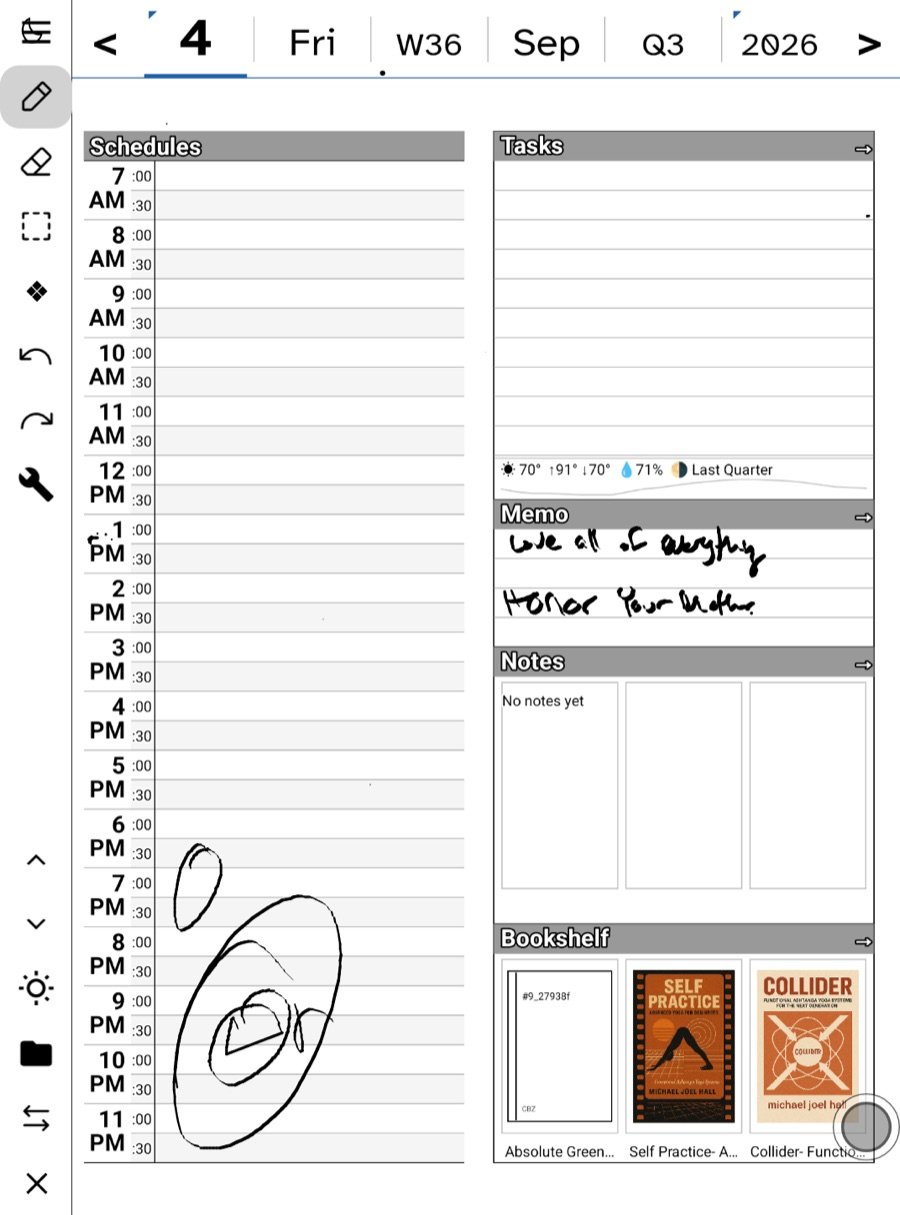
Schedules
The hours of the day, down the side of the page. Two things land here: events from your connected calendar, drawn in place, and whatever you write beside an hour. On iPad the app can read a handwritten schedule entry and turn it into a calendar event. Widgets read this column too, so the home screen shows what is next.
Tasks
Lines with checkboxes. Write a task on a line; tap the box when it is done. The tick is remembered as a fact about the task, not redrawn as a stroke, which is why it survives sync and shows up in the Tasks widget. A task can also be typed, imported from a board, or made from a starred email — they all sit in the same list, and the list has two dressings: a plain list and columns, flipped from the toolbar.
On iPad, handwritten tasks can become Reminders. Ticking one on the home-screen widget marks it done in the app on your next visit; un-ticking is an in-app act.
Memo
Loose thoughts that belong to the day rather than to any task. Nothing is done to Memo ink; it is simply kept with the day.
Notes
The longer writing area, and the door to a full note page. Notes — where you left off reopens the page you were last writing on, with a pager across the top. A day can have as many note pages as you need, and each page can wear a different paper — see Templates and paper.
Doodle (iPad)
A drawing zone on the iPad day page. The e-ink build folds drawing into Notes, so nothing is lost across devices; the zone is just laid out differently.
The strip under the panels
Weather and moon phase for the day. It is written into the day when the page is made, so an old page still shows the weather of that day, not today’s.
Moving between zones
Section up and Section down on the rail jump between zones without scrolling. Sections shows them as a list. On e-ink this matters: a jump is one refresh, a scroll is many.
What the zones share
- All of them accept the pen, the eraser and the lasso.
- Circling ink with the lasso offers to make it into text, a task, a card, or a note.
- Whole page → text in the wrench transcribes everything at once.
- Capture sections takes each zone as its own image rather than the page as one picture.
Where the zones go
The zones are regions on a template. Ledgable ships the day template, but on iPad you can import your own page background and draw your own regions, telling each one whether it holds ink to transcribe, an image, or a checkbox. See Templates and paper.
In this section: The day page
- The zones: Schedules, Tasks, Memo and Notes
- The almanac strip
- All Stars and All Picks
- Templates and paper
Ledgable — cozy and transgressive